EF Core and SQL Server: Can I cancel a running query?
As .NET developers, we are often told to pass a CancellationToken through every asynchronous method we write. We do it to be "good citizens" of the thread pool, but have you ever wondered what actually happens once that request leaves your application and hits the database?
Does the database keep working on that heavy query even after the user has closed their browser? Or does EF Core actually tell the database to "stop everything"?
In this post, we’re going to dive into how CancellationToken works with Entity Framework Core and SQL Server to see if we are truly saving resources.
The "Invisible" Request Problem
Imagine a user triggers a heavy report in your web application. Midway through, they get bored and close the tab or refresh the page.
Without a CancellationToken, your backend remains "alive" for that request. It continues to wait for the database to return data that no one will ever see. This wastes:
- Application Threads: Resources are held up waiting for a response.
- Database Resources: The SQL engine is still burning CPU and I/O to finish the query.
By using the HttpContext.RequestAborted token provided by Kestrel, we can signal to our services that the client is no longer listening.
Setting Up the Experiment
To test this, I created a simple ASP.NET Core API with a UserService. To simulate a long-running query on a small local database, I used a clever T-SQL trick: WAITFOR DELAY .
// Simulating a 5-second database delay
var users = await _context.Users
    .FromSqlRaw("WAITFOR DELAY '00:00:05'; SELECT * FROM Users")
    .ToListAsync(cancellationToken);
The Chain of Responsibility
For this to work, you must pass the token all the way down the chain: Presentation layer (API) → Service Layer → Repository → EF Core Async Method.
The Moment of Truth: SQL Server Profiler
To see what happens inside the database, we use SQL Server Profiler.
Scenario 1: Successful Query
When the query runs to completion, we see a SQL:BatchStarting event followed by a SQL:BatchCompleted event with an Error Code of 0 .

Scenario 2: Cancelled Query
What happens when we trigger the query and then hit Refresh in the browser?
- The
CancellationTokenis triggered. - An
OperationCanceledExceptionis thrown in the .NET application. - The Result in Profiler: We see the
SQL:BatchCompletedevent, but this time the Error Column shows '2' and the status is "Attention" (Aborted).
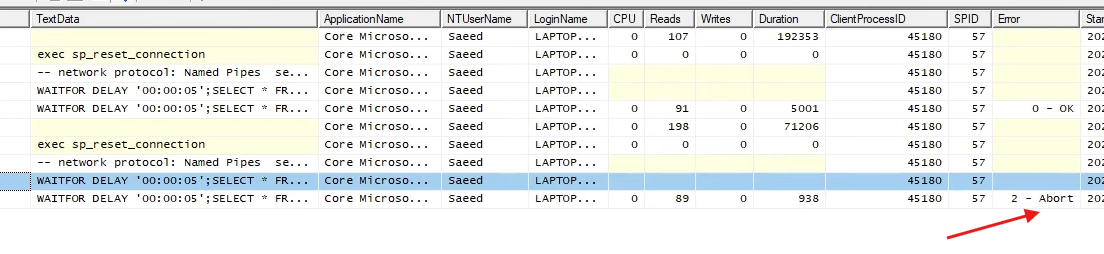
The Verdict: Yes! EF Core sends an "attention" signal to SQL Server, which immediately terminates the execution of the query on the server side.
Best Practices for Cancellation Tokens
1. Don't Break the Chain
If you forget to pass the token at even one level, the cancellation won't reach the database. Always make CancellationToken an optional or required parameter in your async methods.
2. Avoid Manual Token Sources
Don't just create a new CancellationTokenSource inside your repository. If you need a custom timeout (e.g., "cancel after 10 seconds even if the user is still waiting"), use Linked Tokens:
using var cts = CancellationTokenSource.CreateLinkedTokenSource(incomingToken);
cts.CancelAfter(TimeSpan.FromSeconds(10));
var token = cts.Token;
This ensures your query respects both the user's departure and your own internal timeout logic.
Conclusion
Using CancellationToken in EF Core isn't just about cleaning up your C# code; it’s a vital tool for database performance. By properly propagating these tokens, you ensure that when a user walks away, your database stops working for them too.
Watch the full deep dive here: https://youtu.be/XO17isY2uOA